Recuperate the P5 Glove: an Orphaned Data Glove Back to OSC, MIDI and Games
Series: alt.ctrl activities; builds on Game controllers
The P5 Glove (Essential Reality, 2002) reads the bend of all five fingers and tracks the hand by infrared LEDs on its back, seen by two stacked detectors in a receptor tower. Without its vendor's software, the glove is still a plain USB HID device, and that is enough to bring it back.
This recipe recuperates it in stages, each tried on the glove before the next: research what may legally be used, read the streams without writing anything, record and replay them, calibrate and track the hand, turn off the default mouse mapping, build a viewer, and then design the bridges and maps to OSC, MIDI and game devices. It follows the way the glove was brought back on a Mac in October 2026, and most of the work is a staged prompt for a coding assistant, in the Coding Prompt Build Block below.

Materials
| Item | Amazon | Seeed Studio | Mouser | eBay |
|---|---|---|---|---|
| An Essential Reality P5 Glove, with its receptor tower and USB cable | search | |||
| A computer that runs hidapi (the version here used macOS) | ||||
| For game-device emulation, a microcontroller that can be a USB gamepad, such as a Seeed Studio XIAO RP2040 | 102010428 | 713-102010428 |
Tools
- A coding assistant, given the Coding Prompt Build Block below
- hidapi (the bridge here reaches it from Python through ctypes), or the computer's own HID interface (the development readers here use macOS's IOKit from Swift)
- A web browser, for the three.js viewer
- Calipers and a ruler, or a 3D scanner, to model the glove and its tower, and a ruler to check the tracking's units
- An OSC-aware program (Max/MSP, Pd) and a MIDI monitor, to test the bridges
Skills
- Reading USB HID descriptors and reports
- Weighing what a licence allows
- Programming with a coding assistant
- Basic 3D modelling
Instructions
- Research what may legally be used. The open driver is libp5glove (LGPL-2.1). The vendor's USB report document and Windows driver source circulated on community pages, but carry no licence grant, and whether Essential Reality authorised their release could not be verified: read them, don't copy them, and write your own code from a specification of the reports, citing each fact's source.
- Read before writing. Find the glove by vendor 0x0D7F and product 0x0100, print its report descriptor, and listen to input report 1: 24 bytes, about 42 a second, holding five finger bends from 0 to 63, buttons A to C, and up to four LEDs per report. Send the glove nothing at this stage. The readers here were written in Swift, on macOS's own HID interface (IOKit), with a check that fails if a reader gains a call that writes, and they stay as development tools. The bridge that followed is Python, reaching the hidapi C library through ctypes, so it is not tied to macOS; on Linux it needs hidapi's libusb backend, because the kernel puts the P5 on its HID ignore list (read in the kernel's source; not yet tried on Linux). Reports stop while button D has the glove switched off, and appear to stop when no LED is in view (inferred from one episode): neither is a disconnect. No way to disable button D was found: none of the sources searched (the vendor's report document, driver source and 2002 CD, Carl Kenner's Dual Mode Driver, a Linux driver and libp5glove) has a message for it, the vendor's own control panel labels it the glove's power switch, and a read of the undocumented report 0x04 only times out. So the bridge here reports a silence as "out of view, or switched off with button D", never as a disconnect.
- Record every report to a file, and add a replay mode that plays a recording in place of the glove, so that each later stage can be built and tested without it.
- Calibrate. The glove supplies its own receiver calibration (feature report 0x06) and LED geometry (feature report 0x0C); from them, triangulate each LED and fit the hand's position and orientation. libp5glove and the vendor's driver disagree on which of the receiver's angle offsets goes with which detector reading, so test both against the glove's own geometry: triangulate the LEDs seen in one report and compare the distances between them with report 0x0C's, a test that does not depend on where the tower stands. On the glove here libp5glove's pairing, with its lateral formula, fit best in the three recordings made in normal use: the median distance came out 14 to 18 % longer than the geometry's, and the median error of a rigid fit 6 to 9 mm, against 51 to 101 % and 20 to 26 mm with the vendor's pairing. In the fourth, made close to the tower and counting every sighting, every pairing was 2.4 to 3.4 times off, libp5glove's least. What is left over is not yet explained, and it is not a single scale error: the ratio, counting only the LEDs the tracker accepted, changes with depth, from 0.87 to 1.02 at 6 to 10 inches from the tower to 1.13 to 1.39 at 14 to 18 inches, though not steadily in every recording. Carl Kenner's Dual Mode Driver carried per-tower "unwarping" corrections for each P5's manufacturing variation. A ruler can test two of the units involved: if they are read right, the tower's two receptor heads are 200.7 mm apart, and the glove's farthest pair of LEDs, 4 and 6, are 130.1 mm apart. The glove calibrates its bend sensors itself, started and stopped by feature report 0x01; that was not tried here. Never send feature reports 0x0D, 0x0F or 0x10: they write its flash and factory calibration. Do not implement reports 0x07 and 0x08 either: they are an authentication handshake described only in the vendor's source, whose cipher files are marked "Proprietary and Confidential", and the glove streamed here without it on firmware 4.3 (whether Chrome, which also had the glove open, made a difference is not known).
- Track the hand from the LEDs, and expect bad sightings. In reports with four LEDs, one was often more than 2 inches from where the other three put it (in 46 of 66, 77 of 285 and 121 of 639 such reports in three recordings, by up to 229 inches); for the number of times each was seen, LEDs 6 and 7 were the odd one out far more often than LEDs 1 to 3. The bridge here takes libp5glove's idea of comparing each pair of LEDs with report 0x0C, with an absolute limit: with four in view it drops the one whose removal leaves the most consistent three, and it publishes no pose when the rest still disagree or the rigid fit is more than an inch off. With only three in view, some bad sightings cannot be detected from the distances between them. It then smooths the pose with a running median of the last 5, which adds 48 ms; prediction waits until the scale is settled. The earlier drivers did this differently: the vendor's followed one LED's movement with a glitch rule of about 2 inches, Carl Kenner's, by its settings file, averages 11 frames with a dead-band and prediction, and libp5glove drops an LED whose distances to all the others seen are more than 20 % off report 0x0C's.
- Turn off the mouse, with a small separate writer (Swift, like the readers; the Python bridge has the same write as its --mouse option) that touches only that report. As found, the glove moved the computer's pointer. Setting feature report 0x05 to 0xFF turned that off, the one write the work needed and the only one the bridge makes, and it was still off after button D switched the glove back on (seen once). Whether it survives an unplug is not known, so check it at every start.
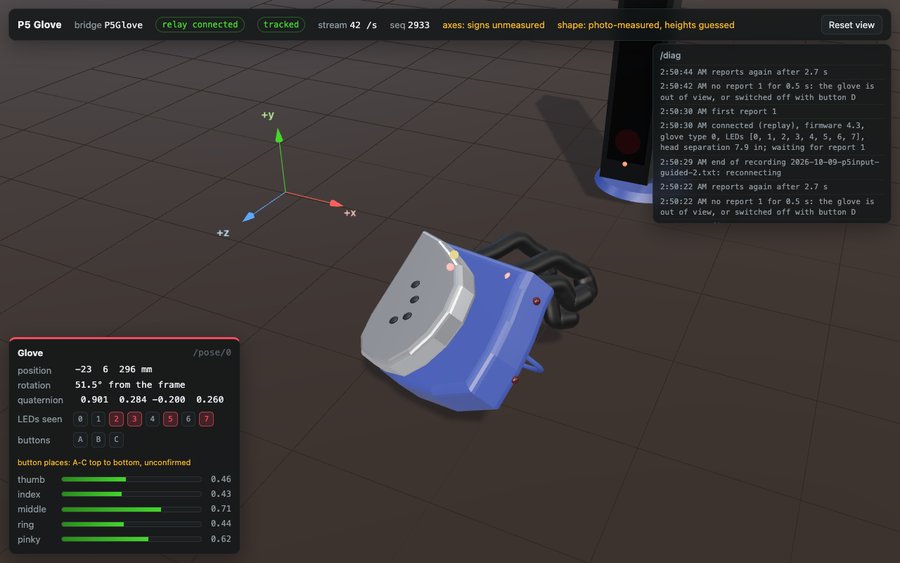
- Model the glove and its tower, from calipers and photos or a scan, and build a three.js viewer that bends each finger, lights the buttons, shows the LEDs in view and moves the hand, following the bridge's recordings as well as the glove. The viewer here (pictured) follows the Razer Hydra's and reuses its relay: the bridge computes the pose and the page draws only what it receives. It shows the tower, and the glove's body, shield, buttons and LEDs, laid out from a labelled photo in Andrew Davison's 2006 chapter on the P5: measured from it, not reproduced, and the glove's own LED geometry fits the eight labelled LEDs within 0.44 inches rms, though three swaps of labels within close pairs fit as well, so the photo confirms the layout of the groups rather than every index. Bend-sensor tubes curl with each finger, their proportions and full-curl angles derived from the WebXR generic hand model and OpenGloves' hand animation (both MIT; only numbers derived from them are used). A view from above gives no heights, so those, and the tower's size, are drawing choices until measured, and the viewer says so.
- Design the bridges and maps. OSC over UDP comes first, named by capability as in the CNMAT OSC library's address contract and the Hydra's bridge: /enq answers with what the glove has, and each report becomes one bundle of /state (a sequence number and the time), /btn (A, B and C), /curl (thumb first, from 0 straight to 1 fully curled: the raw bend over 63; OpenVR's finger curl and Jason Plumb's earlier p5osc also put the thumb first), /pose/0 (the position in metres and a quaternion, once three or more LEDs are seen and agree) and /marker/n for each LED seen. This bridge is built, and records and plays back. The glove's own axes: +x toward the little finger, +y out of the back of the hand, +z toward the wrist; x and z come from the labelled photo, the sign of x from libp5glove, and +y from the LED that sits highest, judged by eye. The tower's axis signs are not yet measured. Then, not yet built here: MIDI control changes and notes, and a game device through a microcontroller presenting itself as a USB gamepad, as in the USB Nunchuck.
- Map the fingers and the hand to sound, or to a game.
Variations
- Two gloves, each feeding its own OSC address, MIDI channel or gamepad (not tried: whether two work on one computer, each with its own tower, is untested).
- Each finger its own controller: map the five bends to five MIDI controllers, and, once the tower's axes are measured, the hand's height to a sixth.
Related resources
- libp5glove: the open driver (LGPL-2.1)
- Replace the Gametrak's Electronics: another controller brought back by its own reports
- Make a Wii Nunchuck a USB Controller: a microcontroller as a composite USB device, MIDI, OSC, gamepad and mouse
- three.js: the 3D library for the viewer
- Recuperate the Razer Hydra: the recuperation whose bridge and viewer this one follows
Coding Prompt Build Block
A prompt to give a coding assistant, to start the code for this activity. Copy the box, answer its questions about your board and pins, and test what comes back on the bench before you rely on it.
I am building "Recuperate the P5 Glove: an Orphaned Data Glove Back to OSC, MIDI and Games", the activity at https://adrianfreed.com/recuperate-p5-glove.html.
Help me bring an Essential Reality P5 Glove (USB 0D7F:0100) back into use on a current computer, without its vendor's software, in stages, each tried on the glove before the next. Use only sources whose terms allow it: libp5glove (LGPL-2.1) and a specification written from the vendor's USB report document. Treat the vendor's own driver source, which carries no licence grant, as reference to read, never code to copy. Code taken from libp5glove stays under its LGPL-2.1. Start by listing each source you use and its terms.
Stage 1, read only: with hidapi (on Linux through its libusb backend, since the kernel ignores this glove), open interface 1 (usage page 0x8C) and print its report descriptor, then listen to input report 1 (24 bytes, about 42 a second) and decode it: five 6-bit finger bends, buttons A to C, and up to four infrared LEDs per report, each a 4-bit index (15 marks an empty slot) and three signed 10-bit detector readings, unwrapped against the same LED's previous reading. Expect silence while button D has the glove switched off, and apparently while no LED is in view; report it as "out of view, or switched off", never as a disconnect, since no known report disables button D. Send nothing to the glove in this stage, keep a check that fails if the reader gains a write call, and record every report to a file, with a replay mode that plays a recording in place of the glove.
Stage 2, calibration: read the glove's own receiver calibration (feature report 0x06) and LED geometry (feature report 0x0C), triangulate each LED from its detector readings, and fit the hand's position and orientation from the LEDs in view. libp5glove and the vendor's driver pair the receiver's angle offsets with the detector readings in opposite ways: try both, and keep the one whose distances between LEDs seen in one report best match report 0x0C's geometry. With four LEDs in view, expect one to disagree with the others by inches: drop the one whose removal leaves the most consistent three, publish no pose when the rest still disagree, and smooth the pose with a running median of 5 (about 48 ms). The glove calibrates its bend sensors itself, started and stopped by feature report 0x01; do not implement it, since it was not tried here. Never send feature reports 0x0D, 0x0F or 0x10, which write the glove's flash and factory calibration, and do not implement reports 0x07 and 0x08.
Stage 3, the mouse: as found, the glove drives the computer's pointer. Turn mouse mode off by setting feature report 0x05 to 0xFF, with a read before and after, and check it at every start, since whether it survives an unplug is not known. Report 0x05 is the only report the program may set: send no SET to any other report, and never probe an undocumented report ID.
Stage 4, a viewer: a three.js page that draws the glove and its receptor tower, curls a bend-sensor tube on each finger by its curl, lights the buttons, shows the LEDs in view and moves the hand by the pose the bridge sends, computing nothing itself. Take the tubes' proportions from the WebXR generic hand model and each joint's angle at full curl from OpenGloves' hand animation (both MIT), and the glove and tower from measurements, a labelled photo or a scan of the real ones, and show on the page which dimensions are guessed. A small local relay passes the stream to the page, and the bridge's record and replay let the mapping be worked on without the glove.
Stage 5, bridges and maps: send OSC over UDP named by capability, as in the CNMAT OSC library's ADDRESSES.md: answer /enq with what is present, and send each report as one bundle of /state (sequence, milliseconds), /btn (A B C), /curl (thumb first, 0 straight to 1 fully curled, the raw bend / 63), /pose/0 (x y z in metres and a quaternion, when three or more LEDs are seen and agree) and /marker/n (x y z of each LED seen). Then MIDI control changes and notes through a virtual MIDI port, and game-device input by passing the readings to a microcontroller that presents itself as a USB gamepad. Keep each map in one table that is easy to edit, and time the path from report to output.
Libraries to explore:
- hidapi: a small cross-platform C library for talking to HID devices: listing them, reading input reports, and getting and setting feature reports; Python can reach it through ctypes or cython-hidapi (https://github.com/libusb/hidapi)
- libp5glove: an open driver for the Essential Reality P5 Glove (LGPL-2.1): its report decoding, LED unwrapping and a trace of the vendor driver's feature reports (https://github.com/ezrec/libp5glove)
- three.js: a JavaScript 3D library (MIT) for drawing a device's model in a web page and moving it with the live stream (https://github.com/mrdoob/three.js)
- WebXR Input Profiles: 3D assets and descriptions of motion controllers for WebXR (MIT), among them a generic hand model whose bones are named as the WebXR Hand Input joints (https://github.com/immersive-web/webxr-input-profiles)
- OpenGloves driver: a SteamVR (OpenVR) driver for VR gloves and DIY hardware (MIT), with full finger tracking; its hand animation gives an angle for each joint of a curling finger (https://github.com/LucidVR/opengloves-driver)
- CNMAT OSC address contract (ADDRESSES.md): one OSC namespace for every board, named by capability, not by board: a program asks /enq, reads back the capabilities present, and receives each stream as a bundle with /state (https://github.com/CNMAT/OSC/blob/master/ADDRESSES.md)
- python-osc: OSC clients and servers in pure Python, over UDP and TCP (https://github.com/attwad/python-osc)
- Adafruit TinyUSB for Arduino: makes the board a USB device with several interfaces at once, among them Serial (CDC), MIDI and HID; TinyUSB's gamepad report has six 8-bit axes, a hat and 32 buttons, and its mouse report moves the pointer; setPollInterval sets, in milliseconds, how often the computer asks for HID reports; see the hid_composite, hid_gamepad and midi_test examples (https://github.com/adafruit/Adafruit_TinyUSB_Arduino)
- Arduino MIDI Library: sends and receives MIDI over any serial port, and over USB, Bluetooth or a network through its transports (https://github.com/FortySevenEffects/arduino_midi_library)
Before writing anything, ask me what I am using: the board and its pins, or the software (such as Max, Pd or Python), and check its documentation for what this needs. Put the pin numbers, ranges and other settings in one block at the top, each with a comment. Say which of the libraries above you use, and why. Start with a test that shows the raw readings, so that I can check the wiring and the ranges before the rest.
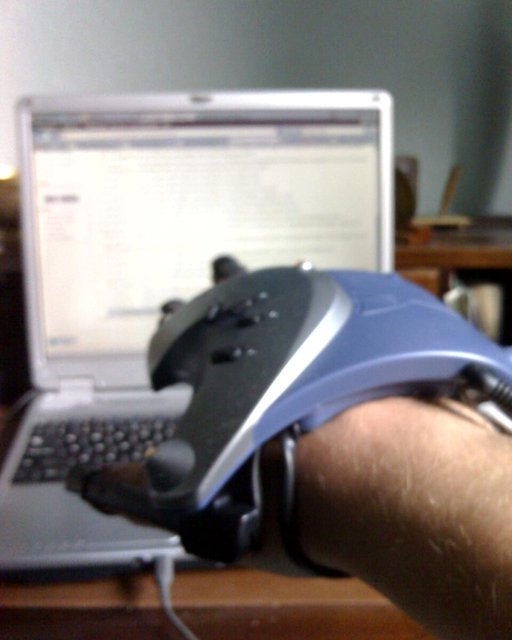
This activity by Adrian Freed is licensed under Creative Commons Attribution-NonCommercial-ShareAlike 4.0 International (CC BY-NC-SA 4.0): you may share and adapt it with attribution, for non-commercial purposes such as personal projects and teaching, and you must share adaptations under the same licence. Product names and links belong to their suppliers. The photo of the glove in use is not covered by this licence: it is in the public domain.