Intervene in USB Controller I/O Streams with an MCU Interposer
Series: alt.ctrl activities; builds on Game controllers
Many modern MCUs have a USB device connector and can also support an additional USB host port, sometimes referred to as an OTG (on-the-go) port.
Materials
| Item | Amazon | Adafruit | SparkFun | Waveshare | Mouser | Digi-Key |
|---|---|---|---|---|---|---|
 | 5723 | 485-5723 | ||||
| ESP32-S3 boards with two USB-C ports (such as an N16R8: 16 MB flash, 8 MB PSRAM), in the style of Espressif's ESP32-S3-DevKitC-1: one port is the ESP32-S3's native USB OTG, the other a USB-to-UART bridge | B0GBT212KM | |||||
| Waveshare RP2350A USB Mini (RP2350-USB-A): USB-C for programming, and a USB-A host port driven by the RP2350's PIO | B0DW8Z2K7C | 30274 | ||||
| Teensy 4.1: a USB host port on a 5-pin header | DEV-16771 | 1568-16771-ND | ||||
| USB Host Cable for Teensy 4.1: the 5-pin host header to a USB-A socket | CAB-28389 | 1568-CAB-28389-ND | ||||
| Teensy 4.0: USB host on two pads on the underside, data only; the board does not power the USB device | DEV-15583 | 474-DEV-15583 | ||||
| USB-A socket to micro-USB plug OTG adapters, 2 pack: for host ports with a micro-USB socket, such as the USB Host BFF's | B0BX9FSCFH | 2910 | ||||
| USB-A to Micro-B cable: from a USB-A host port to a controller with a micro-USB port, such as the DualShock 4 and the Xbox Wireless Controller before its USB-C revisions | 592 | |||||
| USB-A to USB-C cable: from a USB-A host port to a controller with a USB-C port, such as the DualSense, the Switch Pro Controller, and the Xbox Elite Series 2 and third-revision Xbox Wireless Controller | 4474 | |||||
| USB-C to Micro-B cable: from a USB-C host port, such as the SparkFun shield's, to a micro-USB controller | 3878 | |||||
| USB-C to USB-C cable: from a USB-C host port to a USB-C controller | 4199 | |||||
| USB-A socket to USB-C plug adapter: puts a USB-A socket on a USB-C host port, for the USB-A cables above | 5030 |
| Item | Amazon | Adafruit | SparkFun | M5Stack | Mouser |
|---|---|---|---|---|---|
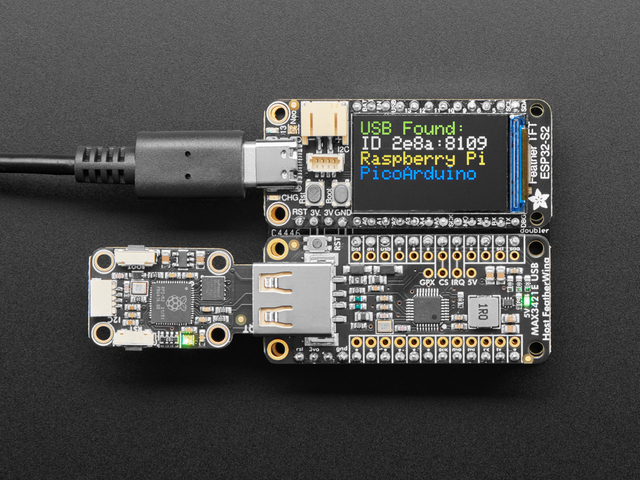 | 5858 | 485-5858 | |||
 | 5956 | 485-5956 | |||
| M5Stack Module USB v1.2 (MAX3421E), for the Basic, Core2 and CoreS3 controllers | M020-V12 | 170-M020-V12 | |||
 | DEV-21247 | 474-DEV-21247 | |||
| Mini USB Host Shield 2.0, SPI, sized for the Arduino Pro Mini. Check that the board you receive carries the MAX3421E, runs at 3.3 V and has a USB-A socket | B0DC9MFKJR |
Tools
- The Arduino IDE, with the board's core and the host library
- A USB descriptor and report dump, from the host library's own examples: USB_desc in the USB Host Shield library, HIDDeviceInfo in USBHost_t36, or Adafruit TinyUSB's hid_device_report, which prints the vendor and product IDs and each report
- The computer's game-controller settings, or a gamepad tester in a browser, to test the pass-through
- A coding assistant, given the Coding Prompt Build Block below
Skills
- Programming an MCU with a USB host library
Instructions
- With the controller attached, identify the closest existing device that the host library already supports.
- Test that, then expand it with the special features the particular device exposes.
- Identify a USB profile similar to the device's, and create a pass-through that provides everything the controller does.
- Once this is tested, you can write your own remappings.
Variations
- Configure instead of code: flash the Feather RP2040 with USB Type A Host with HID Remapper and set its mappings in a Chrome-based browser. It can also map keyboard keys and mouse buttons to gamepad buttons; the Nintendo Switch is the only console it works with out of the box. (Adafruit's turbo-button guide in Related resources does its remapping in code instead, with Adafruit TinyUSB.) Compare Replace a Game Controller with Mouse and Keyboard.
- Merge controllers: put a USB hub on the host port and combine several devices into one gamepad, as HID Remapper's manual describes; see also Make a Universal Platform for Frankensteining Controllers.
- Add controls the controller lacks: wire buttons or sensors to the board's free pins and merge them into the reports it passes on, such as pressure-sensing buttons from Add Pressure Sensitivity to Switches (HID Remapper takes plain buttons on its pins).
Related resources
- Libraries: USB Host Shield Library 2.0, the Arduino library for MAX3421E host adapters, with drivers for HID devices and for Xbox, PS3, PS4, PS5, Switch Pro and Wii controllers
- Adafruit TinyUSB for Arduino: USB host through a MAX3421E, or on the RP2040 through Pico-PIO-USB
- Pico-PIO-USB: USB host through the PIO of the RP2040 and RP2350
- USBHost_t36, PJRC's USB host library for the Teensy, with a joystick driver
- Adafruit: DIY Turbo Button Controller - HID Remapper, a Feather RP2040 USB Host that passes a gamepad through and adds a turbo button
- Adafruit guides: Feather RP2040 with USB Type A Host, USB Host FeatherWing with MAX3421E, USB Host BFF and Using a Keyboard with USB Host
- PJRC forum: T3.6 USB Host - Joysticks, on extending USBHost_t36's game controller support (PS3, PS4, Xbox)
Coding Prompt Build Block
A prompt to give a coding assistant, to start the code for this activity. Copy the box, answer its questions about your board and pins, and test what comes back on the bench before you rely on it.
I am building "Intervene in USB Controller I/O Streams with an MCU Interposer", the activity at https://adrianfreed.com/usb-controller-mcu-interposer.html.
Write a program for a microcontroller with a USB host port that sits between a USB game controller and a computer. First, list the controller's descriptors and print its reports as they arrive, so that we can see what each control sends.
Then find the closest device that the host library already supports, and test that. Then make a pass-through: the microcontroller appears to the computer as a USB device of a similar kind, and passes on everything the controller does. Then add remappings, each in its own small function: swapping buttons, scaling an axis, adding a turbo button.
If the board cannot be a USB host and a USB device at once (on an ESP32-S3, the USB host takes the peripheral that the USB device stack would use), send the data to the computer another way, such as serial over the board's other port.
Libraries to explore:
- Adafruit TinyUSB for Arduino: USB device and host: host through a MAX3421E, or on the RP2040 through Pico-PIO-USB; its DualRole examples are both at once: hid_device_report prints a device's reports, and hid_remapper passes a keyboard's reports on to the computer, changed (https://github.com/adafruit/Adafruit_TinyUSB_Arduino)
- Pico-PIO-USB: USB host or device through the PIO of the RP2040 and RP2350 (https://github.com/sekigon-gonnoc/Pico-PIO-USB)
- USBHost_t36: PJRC's USB host library for the Teensy, with a joystick driver (https://github.com/PaulStoffregen/USBHost_t36)
- USB Host Shield Library 2.0: the Arduino library for MAX3421E host adapters, with drivers for HID devices and for Xbox, PS3, PS4, PS5, Switch Pro and Wii controllers (https://github.com/felis/USB_Host_Shield_2.0)
- M5-Max3421E-USBShield: M5Stack's library and examples for its USB modules (MAX3421E), built on Adafruit TinyUSB (https://github.com/m5stack/M5-Max3421E-USBShield)
- Arduino-ESP32 USB Host API: USB host for HID devices, including gamepads, and for serial adapters and storage, on the ESP32-S2, ESP32-S3 and ESP32-P4; the host needs the USB peripheral that the board's USB device stack would otherwise hold (https://docs.espressif.com/projects/arduino-esp32/en/latest/api/usb_host.html)
Before writing anything, ask me what I am using: the board and its pins, or the software (such as Max, Pd or Python), and check its documentation for what this needs. Put the pin numbers, ranges and other settings in one block at the top, each with a comment. Say which of the libraries above you use, and why. Start with a test that shows the raw readings, so that I can check the wiring and the ranges before the rest.
This activity by Adrian Freed is licensed under Creative Commons Attribution-NonCommercial-ShareAlike 4.0 International (CC BY-NC-SA 4.0): you may share and adapt it with attribution, for non-commercial purposes such as personal projects and teaching, and you must share adaptations under the same licence. Product names and links belong to their suppliers.