Tethered Theremin
Series: alt.ctrl activities; builds on Gametrak and Theremin
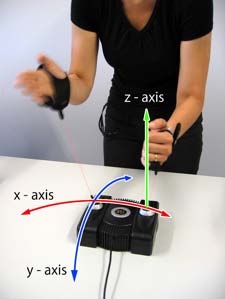
A first exercise in calibrating, mapping and scaling Gametrak gestures. The gloves are worn as intended. One hand's sideways position stands in for its distance from a theremin's upright pitch antenna; the other hand's tether extension stands in for its distance from the volume loop.
Materials
| Item | Amazon | eBay |
|---|---|---|
| A Gametrak controller (originally sold with two gloves and a footswitch) | search | |
| A computer with Max/MSP or Pd |
Tools
- A screwdriver and a soldering iron, for Set Up a Gametrak for Music
- Headphones or a loudspeaker
Skills
- Mapping and scaling controller data in Max/MSP or Pd
Instructions
- Set the Gametrak up as in Set Up a Gametrak for Music. Put on the gloves.
- Calibrate: record the range of each reading you will use, from one end of a comfortable gesture to the other.
- Map one hand's x axis, its sideways position, to the pitch of an oscillator.
- Map the other hand's z axis, how far its tether is pulled out, to the volume.
- Scale both: choose the pitch range, and the curves from position to pitch and from extension to loudness.
Variations
- Map the pitch hand's y axis to a wave-shaping filter.
- The Tethertonium and the Ondestrak take the same idea toward the trautonium and the Ondes Martenot.
Related resources
- Musical Applications and Design Techniques for the Gametrak Tethered Spatial Position Controller, Freed and others, SMC 2009, section 4.1
- Theremin (Wikipedia)
Coding Prompt Build Block
A prompt to give a coding assistant, to start the code for this activity. Copy the box, answer its questions about your board and pins, and test what comes back on the bench before you rely on it.
I am building "Tethered Theremin", the activity at https://adrianfreed.com/tethered-theremin.html.
Write a Max or Pd patch, or a program, that plays a theremin from a Gametrak's readings, read as in the activity Set Up a Gametrak for Music. Calibrate: record the range of each reading used, from one end of a comfortable gesture to the other. Map one hand's x axis, its sideways position, to an oscillator's pitch, and the other hand's z axis, how far its tether is pulled out, to the volume.
Make the pitch range, and the curves from position to pitch and from extension to loudness, easy to change while playing.
Libraries to explore:
- o.io.gametrak (CNMAT MMJ Depot): CNMAT's Max patch for the Gametrak: it opens the device and outputs /left/x, /left/y, /left/z, /right/x, /right/y, /right/z and /footswitch, the angles scaled from -1 to 1 and the extensions from 0 to 1 (https://github.com/CNMAT/CNMAT-MMJ-Depot/tree/master/patchers/io/gametrak)
- odot (CNMAT): the o. objects for Max and Pd that o.io.gametrak is built from, with OSC bundles as their data type (https://github.com/CNMAT/CNMAT-odot)
- Max hi object: reads human interface devices, such as game controllers, in Max (https://docs.cycling74.com/reference/hi/)
- Pd hid external: reads USB HID devices, such as joysticks and gamepads, in Pd, on GNU/Linux and macOS (https://github.com/pd-externals/hid)
Before writing anything, ask me what I am using: the board and its pins, or the software (such as Max, Pd or Python), and check its documentation for what this needs. Put the pin numbers, ranges and other settings in one block at the top, each with a comment. Say which of the libraries above you use, and why. Start with a test that shows the raw readings, so that I can check the wiring and the ranges before the rest.
This activity by Adrian Freed is licensed under Creative Commons Attribution-NonCommercial-ShareAlike 4.0 International (CC BY-NC-SA 4.0): you may share and adapt it with attribution, for non-commercial purposes such as personal projects and teaching, and you must share adaptations under the same licence. Product names and links belong to their suppliers.