Recuperate the Sensel Morph: Pressure Images, Overlays and Games on an Apple-Silicon Mac
Series: alt.ctrl activities; builds on Game controllers
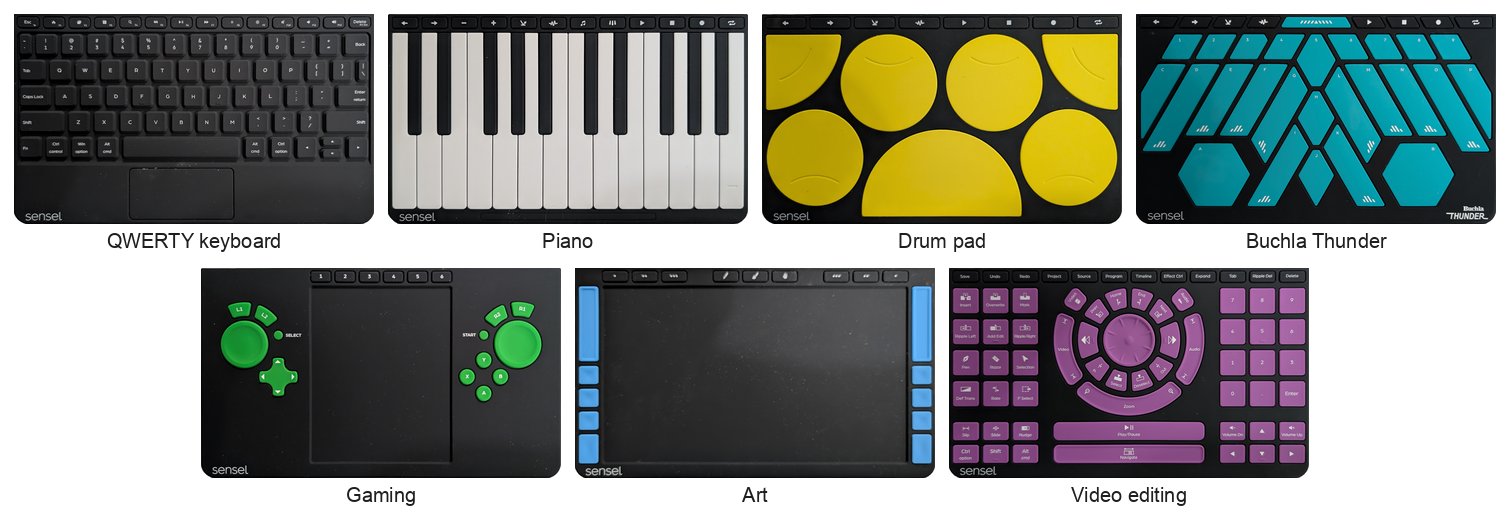
The Sensel Morph reads force over its whole 230 × 130 mm surface as an image, 185 by 105 cells, and changes its role with magnetic overlays: a keyboard, a piano, a drum pad, Don Buchla's Thunder, a game controller, an art tablet. Official development of its SDK ceased in 2017 (Sensel-Morph-Liberation), and Sensel's API repository says: "There are currently no libraries compiled for Apple Silicon" (sensel-api).
This recipe recuperates it in stages, as for the P5 Glove and the Razer Hydra. The source of the native Apple-silicon route is Sensel-Morph-Liberation (Golan Levin, 2026, MIT): an open implementation of the pressure decoding that Sensel shipped only as closed libraries. Start with the gaming overlay; the drum pad, plain, Buchla Thunder and Art overlays follow, as ideas for games.
Materials
| Item | Amazon | eBay |
|---|---|---|
| A Sensel Morph and its USB cable | search | |
| Its overlays: the gaming overlay first, then the drum pad, Buchla Thunder and Art overlays, and the plain overlay | search | |
| An Apple-silicon Mac (such as an M5 on macOS 26.2), or any computer that runs Python 3.10 |
Tools
- A coding assistant, given the Coding Prompt Build Block below
- Apple's command-line tools (clang and make), to build libsensel
- Python 3.10 or later for Liberation's tools, kept in an environment of its own (such as uv)
- A HID monitor and a MIDI monitor, to see what the firmware sends (such as small C tools on IOKit and CoreMIDI)
- Processing 4.5.5, for Liberation's viewers, recorder and player
Skills
- Reading USB HID and MIDI streams
- Weighing what a licence allows
- Programming with a coding assistant
- Basic image processing
Instructions
- Research what may legally be used. Sensel's sensel-api is MIT, and its libsensel talks to the Morph over its USB serial port. The part that decodes force images, libSenselDecompress, came only as closed binaries: for the Mac, x86_64 only (it runs under Rosetta), under a licence whose section 2.1 restricts reverse engineering, with a conditional exception for interoperability; for ARM, only a 32-bit Linux build, shipped with no licence file. Neither runs natively on an Apple-silicon Mac, and a native build made from either would mean disassembling it. Section 2.1 of the Mac licence rules that out (not legal advice). Sensel-Morph-Liberation (MIT) is an open reimplementation. Its own documentation says it combined Sensel's public SDK, third-party code, recordings from a real Morph and disassembly of Sensel's Windows decompression library, and its repository keeps a copy of that library in its archive folder. Weigh that for your use. Use its published code, and take no Sensel binary apart.
- Build natively. libsensel's MIT source builds for arm64 with Apple's clang; without the closed decompressor it gives contacts but not force images. Liberation's Python tools give the force images natively. Sensel's x86_64 library, which would need Rosetta, is not used.
- Find the Morph before opening anything. It is USB vendor 0x2C2F, a composite device: two serial interfaces ("Sensel Dev Port"), "Sensel Trackpad", "Sensel MIDI", "Sensel Digitizer" and "Sensel PTP". libsensel's device scan opens every /dev/cu.usbmodem* and tty.usbmodem* port and writes three bytes to it, even when you name a port, since libsensel looks it up in the list that scan builds. So unplug other USB serial devices first, and give Liberation's bridge the Morph's own port: by default it takes the first usbmodem port it finds.
- Read the streams and record them: contacts from libsensel, pressure images from Liberation, whose tools also record, replay and view sessions. Start scanning promptly after setting the Morph up, and check every frame's grid: waiting 2.5 s or more before scanning gives empty frames on the coarse 47 × 27 grid although the device reports high detail. Liberation's capture tool waits --countdown seconds first, so set that to 1 or less.
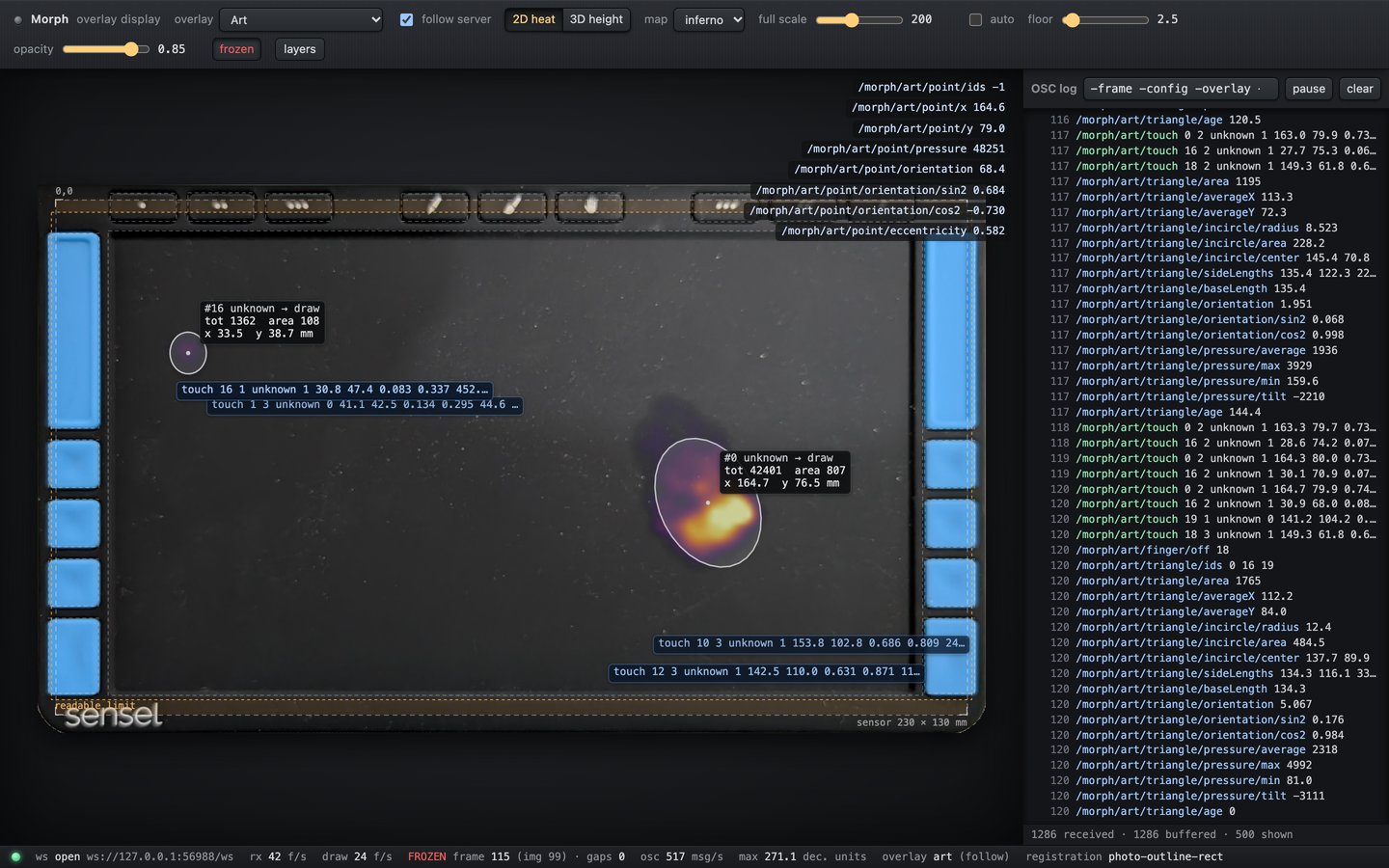
- Learn the overlays' magnets. Each overlay carries eight magnets that hold it in place and tell the firmware which overlay it is (Sensel's guide). They also press on the sensor, as spots at rest along its top and bottom edges (pictured). They are not phantom touches: subtract a baseline taken hands-off, and use the pattern itself to tell the overlays apart. The share of resting pressure at eight magnet positions told three overlays apart in all 1,528 frames tried, with templates taken from the same captures. With the Buchla Thunder on, the firmware also sent a MIDI SysEx message carrying 0x10, the Thunder's overlay number, when a serial session started.
- Find what the firmware sends on its own, overlay by overlay: keystrokes, a mouse, MIDI, a gamepad or a graphics tablet, logged with a HID monitor and a MIDI monitor, each with a positive control. While a serial session streams, the firmware stops sending MIDI, keystrokes, the mouse and the Art overlay's tablet output. The mouse and the tablet output come back 2.9 and 2.7 s after the stream stops. Keystrokes and the mouse matter most, since they act on whatever has the focus: keep the focus out of terminals while you test, and keep the session open between streams. Use a supervisor that restarts the bridge, and only reads a register once a second while nothing streams. Sensel's own example 1 has, commented out, a write of 0 to register 0xD4 that lets the serial API and MIDI run together.
- Start with the gaming overlay. Hands off, capture its magnet pattern as a template. Then, with no serial session, log its gamepad output: it sends four axes, X, Y, Z and Rx, and 16 buttons, and no keystrokes or mouse. Log it again while the bridge streams and you press the controls, with the contacts as proof of the presses, to see whether streaming mutes the gamepad.
- Map the gaming overlay. Press the centre of each printed control and record where its contact lands: A, B, X, Y, the four D-pad arrows, L1, R1, L2, R2, SELECT, START, the two stick discs, the six remappable buttons and the trackpad area. No source gives the overlay's geometry. Map the Art overlay's 20 controls and its drawing area the same way, tapping each control on a spoken cue and taking the contact at its greatest force. Then map it two ways: translate the firmware's own gamepad output, or read the raw contacts with your geometry, which can add what the firmware does not send, such as each button's pressure.
- Try the other overlays for games: the drum pad's 13 zones, whose notes go out on MIDI channel 10 (Sensel's guide), and its 8 buttons, for rhythm games with velocity and pressure; the plain overlay's whole pressure image, for games of pushing, weighing and shaping with the hands; the Buchla Thunder's 23 slanted pads, made for slides and pressure, and its two hexagons, which send horizontal, vertical and pressure values, for steering and flying; and the Art overlay's tools, told apart by their pressure footprints (a pen's peak separates from a fingertip's, while a brush and a fingertip overlap), for drawing and tracing games.
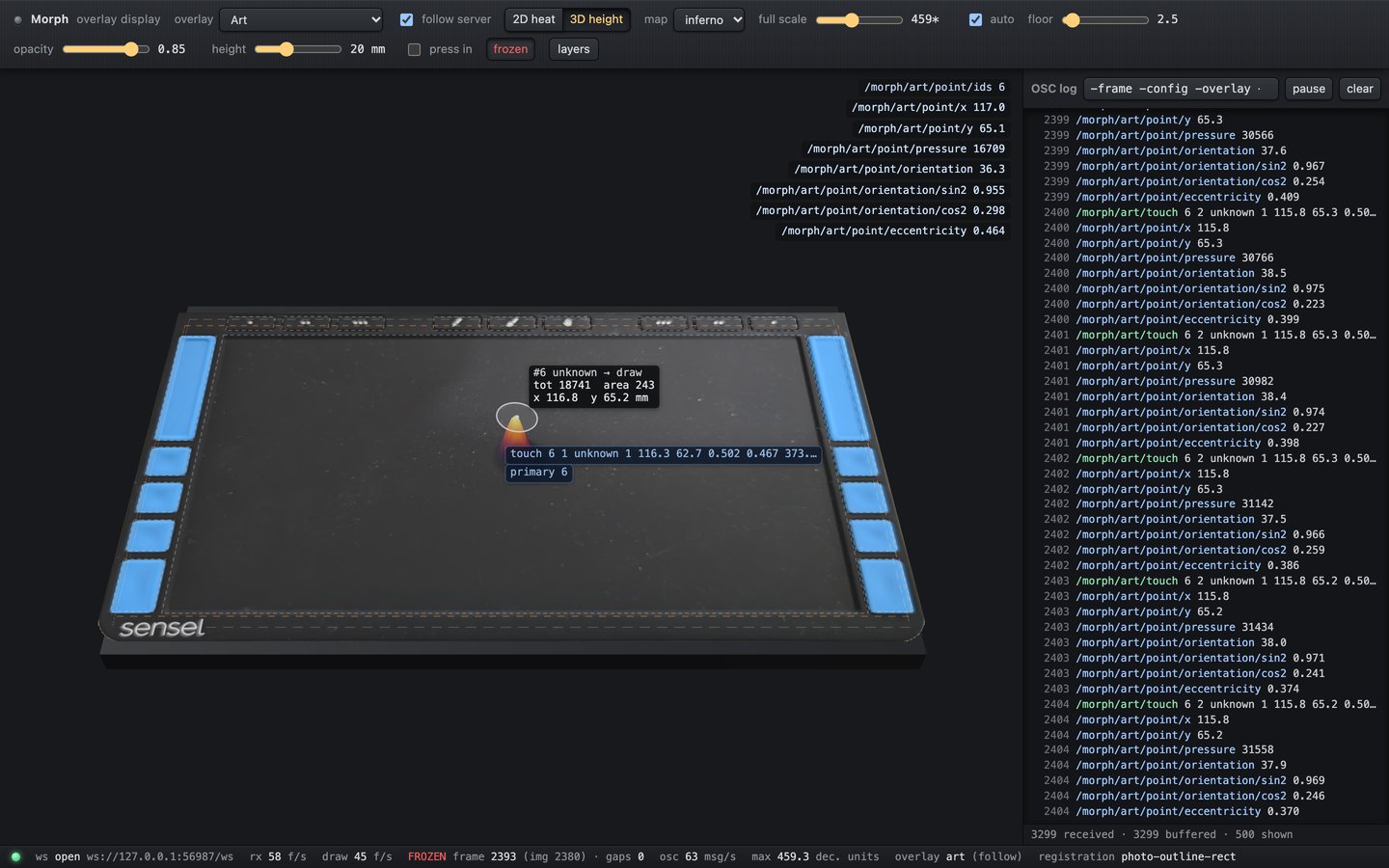
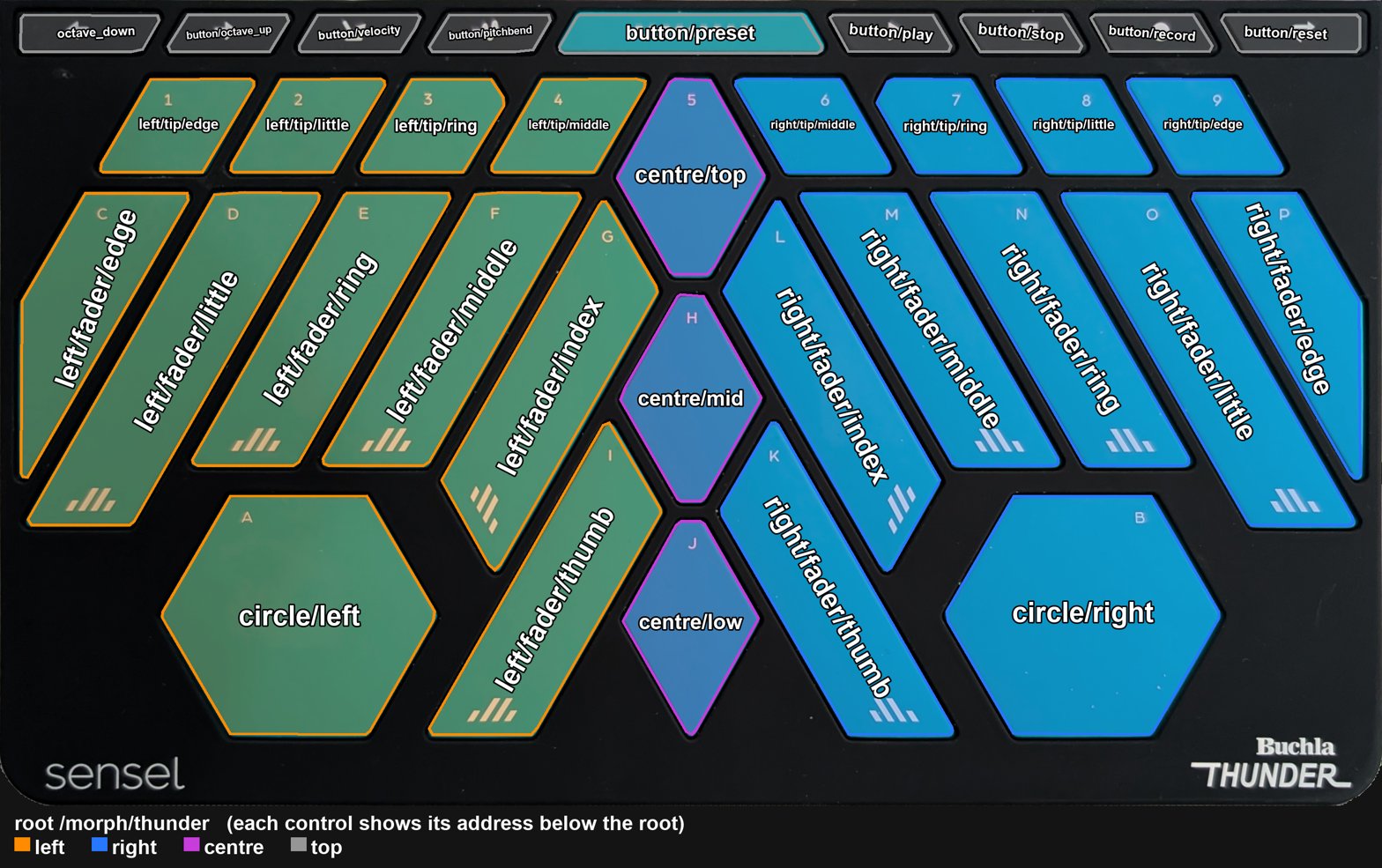
- Design the bridges and maps: OSC per overlay, from Sensel's own map files, which give one rectangle per control and still have to be checked by pressing each control's centre; then MIDI, and a game device through a microcontroller, as for the other recuperations. Give the Buchla Thunder overlay's 34 controls addresses that read it as two hands: on each side six faders named by finger, from the outer edge in (edge, little, ring, middle, index) and the thumb, four fingertip pads above them, and the hexagon as that hand's circle; three centre pads between the hands; and nine buttons along the top (pictured). Watch any overlay in a browser: the browser display draws the pressure image as a heat map or a 3D height map, each touch with its number, the controls' outlines, and every OSC message, at the place on the pad it comes from and in a log, from the live Morph or a recorded capture (pictured).
- If the firmware's contacts are not enough, track fingers in the images yourself. This tracker subtracts the hands-off baseline, smooths, finds peaks, splits blobs by watershed and links them frame to frame, with SciPy, scikit-image and trackpy (BSD-style licences); on real captures it found no tracks hands-off and the one finger pressed.

Variations
- The Innovator's overlay, which Sensel's guide offers for making your own: lay out a game's controls on it, and map them from the raw contacts.
- Two Morphs, one per player, each on its own port.
Related resources
- Sensel-Morph-Liberation: the open decoder, bridges and Processing tools (MIT)
- sensel-api: Sensel's MIT libsensel and its examples
- Sensel's Morph guide: the overlays and what each one sends
- Recuperate the P5 Glove and the Razer Hydra: the other recuperations
Coding Prompt Build Block
A prompt to give a coding assistant, to start the code for this activity. Copy the box, answer its questions about your board and pins, and test what comes back on the bench before you rely on it.
I am building "Recuperate the Sensel Morph: Pressure Images, Overlays and Games on an Apple-Silicon Mac", the activity at https://adrianfreed.com/recuperate-sensel-morph.html.
Help me bring a Sensel Morph back on an Apple-silicon Mac, natively, without Rosetta and without Sensel's closed libraries, in stages, each tried on the device before the next. Use Sensel's MIT sensel-api (libsensel) and the MIT Sensel-Morph-Liberation; do not disassemble, load or translate Sensel's closed binaries. Start by listing each source you use and its terms.
Stage 1: build libsensel for arm64 and print the device's serial number, firmware and sensor size. Find the Morph's serial port by its USB vendor ID, 0x2C2F, from the system's device registry. Have me unplug other USB serial devices first: libsensel's open functions look the port up in a list built by a scan that writes to every usbmodem port. Pass the Morph's port explicitly to Liberation's tools, whose bridge otherwise takes the first. Read contacts with libsensel and pressure images with Liberation's Python decoder, start scanning within a second of setting the device up, check every frame's grid, and record sessions that can be replayed.
Stage 2, the overlays: subtract a hands-off baseline so that the overlay's eight magnets are not taken for touches, identify the overlay from its resting magnet pattern, and log the MIDI SysEx the firmware sends when a session starts.
Stage 3, the firmware's own outputs: log its HID keyboard, mouse, gamepad and digitizer output and its MIDI, with and without a streaming session, with a positive control each time, and keep the session alive between streams, with nothing but register reads, and check whether keystrokes and the mouse stay muted (one test here suggests they do). Warn me to keep the keyboard focus away from terminals while I touch the Morph, since it can type.
Stage 4, the gaming overlay: record where each printed control's contact lands, then map it to OSC two ways, from the firmware's HID gamepad output and from raw contacts with that geometry, adding each control's pressure.
Stage 5: propose game mappings for the drum pad, the plain overlay's whole pressure image, the Buchla Thunder's pads and hexagons, and the Art overlay's tools, each as one table I can edit, and time the path from frame to output.
Libraries to explore:
- sensel-api: Sensel's API: the MIT source of LibSensel, which talks to Sensel devices and can be compiled not to depend on the closed LibSenselDecompress, with examples in C, Python and C# (https://github.com/sensel/sensel-api)
- Sensel Morph Liberation: an open implementation (MIT, Golan Levin, 2026) of the Morph's protocol and its pressure and label decoding, with bridges to OSC, WebSockets and Syphon and tools to record, replay and calibrate, in Python and Processing (https://github.com/CreativeInquiry/Sensel-Morph-Liberation)
- python-osc: OSC clients and servers in pure Python, over UDP and TCP (https://github.com/attwad/python-osc)
- hidapi: a small cross-platform C library for talking to HID devices: listing them, reading input reports, and getting and setting feature reports; Python can reach it through ctypes or cython-hidapi (https://github.com/libusb/hidapi)
Before writing anything, ask me what I am using: the board and its pins, or the software (such as Max, Pd or Python), and check its documentation for what this needs. Put the pin numbers, ranges and other settings in one block at the top, each with a comment. Say which of the libraries above you use, and why. Start with a test that shows the raw readings, so that I can check the wiring and the ranges before the rest.
This activity by Adrian Freed is licensed under Creative Commons Attribution-NonCommercial-ShareAlike 4.0 International (CC BY-NC-SA 4.0): you may share and adapt it with attribution, for non-commercial purposes such as personal projects and teaching, and you must share adaptations under the same licence. Product names and links belong to their suppliers.