Round Slide Harp
Series: alt.ctrl activities; builds on Gametrak and Harp; Spatial arrangement
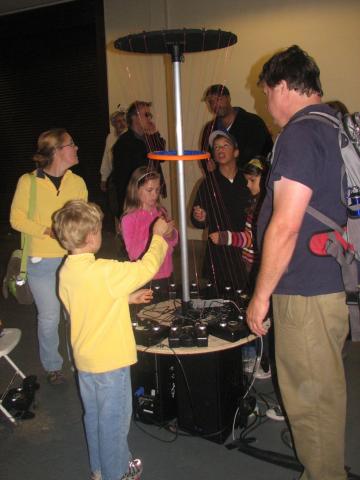
A harp large enough for groups: its strings are Gametrak tethers, bound together by a movable ring. Its upright, round form lets walk-up groups play together, seeing each other through the strings. The ring is playable too: its vertical, sideways and twisting motion is sensed through the strings, and it can help or hinder plucking and pulling particular strings, so players have to listen to each other. A handful of Gametraks connect to Max/MSP through a multiport USB hub.
Materials
| Item | Amazon | eBay |
|---|---|---|
| Several Gametrak controllers | search | |
| A multiport USB hub | ||
| A ring to bind the strings together | ||
| A frame: a round base, with a pole at its centre and a disc at the pole's top, to which the tethers run (as in the photographs) | ||
| The frame's sizes and materials (the base's diameter and height, the pole's length, the disc's diameter), and how the disc is fixed to the pole: not yet specified. | ||
| A computer with Max/MSP | ||
Tools
- Screwdriver
- Soldering iron
- Tools for building the frame: not yet listed.
Skills
- Soldering
- Reading HID devices in Max/MSP
- Mapping controller data to sound
Instructions
- Set each Gametrak up for a computer, as in Set Up a Gametrak for Music.
- Arrange the Gametraks in a circle on the round base, round the central pole, with their tethers pointing up.
- Pull each tether up to the disc at the top of the pole and fix its end there, so that it runs taut like a harp string.
- Bind the tethers together part way up with the ring, so that it can be moved up and down them, sideways, and twisted.
- Connect the Gametraks to the computer through the multiport USB hub.
- Tell the Gametraks apart: they are identical devices, so pull one tether of each and note which device answers.
- Detect plucks and pulls on each string. As for the Tea-Chest Bass, a pluck shows as an impulse on the tether's x and y axes, and its size tells how far the string was pulled from its average position; a pull changes its extension.
- Read the ring from the strings: it carries no sensor of its own. Moving it up and down or sideways, or twisting it, changes the pull length and the joystick position of every tether around it, and the software reads the ring's motion from those changes together.
- Try different mappings from gesture to sound. Look for ones that make multi-part music in which every player feels their gestures make a difference and cannot do anything wrong, without falling back on canned loops.
- Play it in a group, standing round it and watching each other through the strings.
Variations
- Take the Gametraks apart and remount their sensors closer together, for more strings round the circle, as in the Kotrak.
- Pin some strings along a fingerboard so that they can be stopped as well as plucked, as in the Tea-Chest Bass.
- Add conductive thread to some strings and a conductive surface to press them onto, and time the touches with the Gametraks' footswitch inputs, as in the Tethertonium.
- Replace the Gametraks' electronics with your own microcontrollers, each sending its own OSC messages, so the computer need not tell identical devices apart: see Replace the Gametrak's Electronics.
Related resources
- Round Slide Harp, the instrument's page, with a video
Coding Prompt Build Block
A prompt to give a coding assistant, to start the code for this activity. Copy the box, answer its questions about your board and pins, and test what comes back on the bench before you rely on it.
I am building "Round Slide Harp", the activity at https://adrianfreed.com/build-round-slide-harp.html.
Write a Max patch, or a program, for a round harp whose strings are the tethers of several Gametraks, connected to the computer through a multiport USB hub and bound together by a movable ring. The Gametraks are identical devices: let me tell them apart by pulling one tether of each.
Detect plucks and pulls on each string. The ring carries no sensor of its own: its vertical, sideways and twisting motion shows as changes in the extension and the two angles of every tether at once. Read the ring's motion from those changes together, and ask me how to tell a move of the ring from a pluck or pull on one string before writing that part.
Libraries to explore:
- o.io.gametrak (CNMAT MMJ Depot): CNMAT's Max patch for the Gametrak: it opens the device and outputs /left/x, /left/y, /left/z, /right/x, /right/y, /right/z and /footswitch, the angles scaled from -1 to 1 and the extensions from 0 to 1 (https://github.com/CNMAT/CNMAT-MMJ-Depot/tree/master/patchers/io/gametrak)
- odot (CNMAT): the o. objects for Max and Pd that o.io.gametrak is built from, with OSC bundles as their data type (https://github.com/CNMAT/CNMAT-odot)
- Max hi object: reads human interface devices, such as game controllers, in Max (https://docs.cycling74.com/reference/hi/)
Before writing anything, ask me what I am using: the board and its pins, or the software (such as Max, Pd or Python), and check its documentation for what this needs. Put the pin numbers, ranges and other settings in one block at the top, each with a comment. Say which of the libraries above you use, and why. Start with a test that shows the raw readings, so that I can check the wiring and the ranges before the rest.
This activity by Adrian Freed is licensed under Creative Commons Attribution-NonCommercial-ShareAlike 4.0 International (CC BY-NC-SA 4.0): you may share and adapt it with attribution, for non-commercial purposes such as personal projects and teaching, and you must share adaptations under the same licence. Product names and links belong to their suppliers.